> ## Documentation Index
> Fetch the complete documentation index at: https://docs.apiany.ai/llms.txt
> Use this file to discover all available pages before exploring further.

# Cherry Studio 集成

> 在 Cherry Studio 中配置 APIAny.AI API Key、Base URL 和推荐模型。

[Cherry Studio](https://www.cherry-ai.com/) 可以通过 OpenAI 兼容配置接入 APIAny.AI。完成配置后，你可以在同一个客户端中使用对话、推理、翻译和多模态模型。

## 准备工作

* 已安装 Cherry Studio。
* 已在 [APIAny.AI 控制台](https://apiany.ai/zh/dashboard/api-keys) 创建 API Key。
* 已准备一个要使用的模型 ID，例如 `gpt-5.4-mini` 或 `gpt-4o-mini`。

## 配置值

| 字段      | 填写内容                                 |
| ------- | ------------------------------------ |
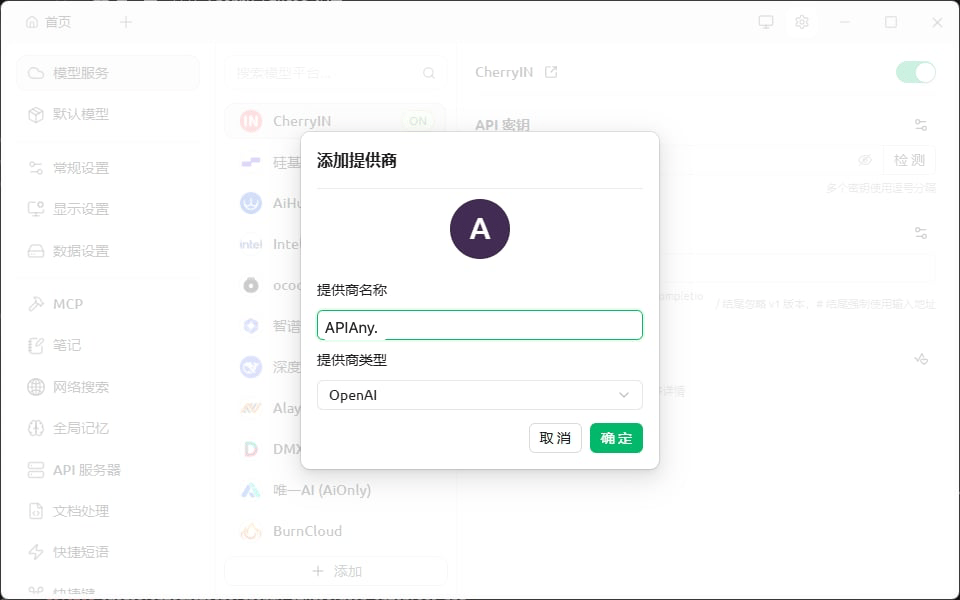
| Name    | `APIAny.AI`                          |
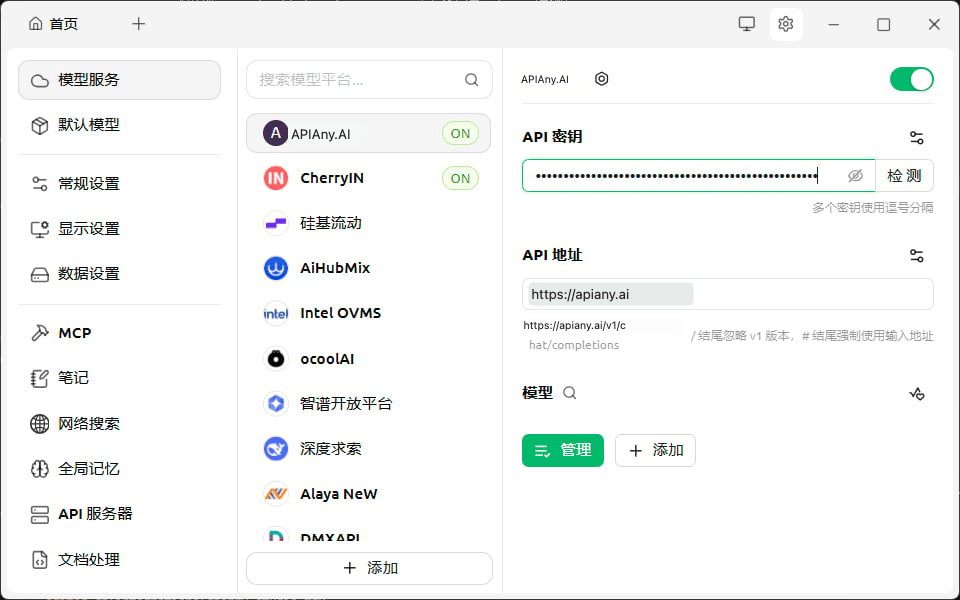
| API Key | 你的 APIAny.AI API Key                 |
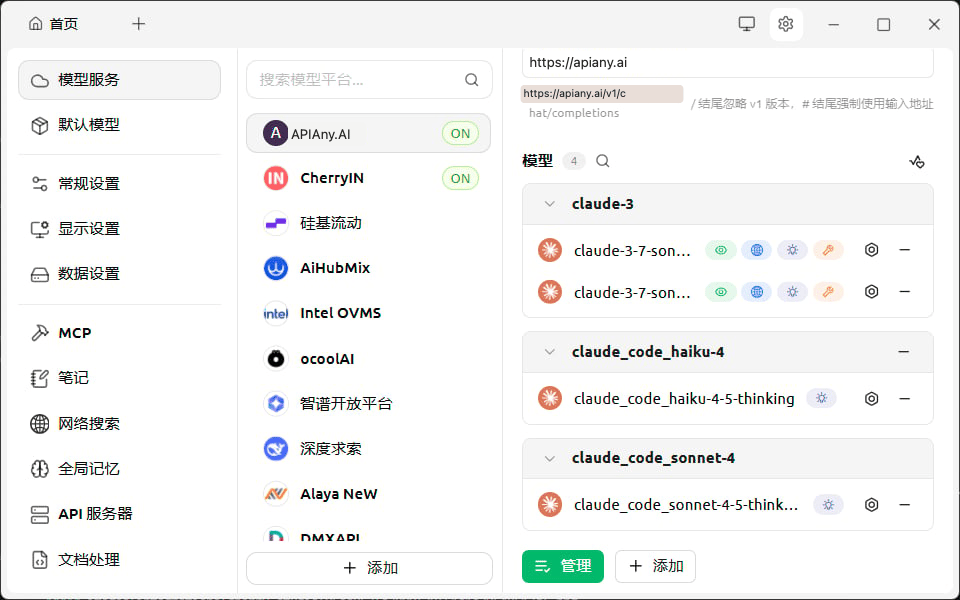
| API URL | `https://apiany.ai`                  |
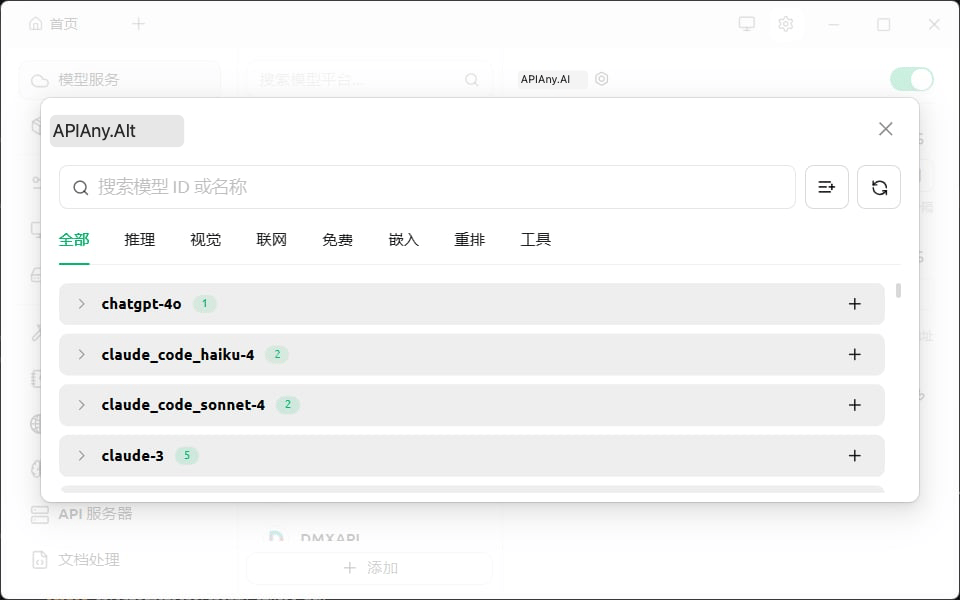
| 模型      | `gpt-5.4-mini`、`gpt-4o-mini` 或其它可用模型 |

## 配置步骤

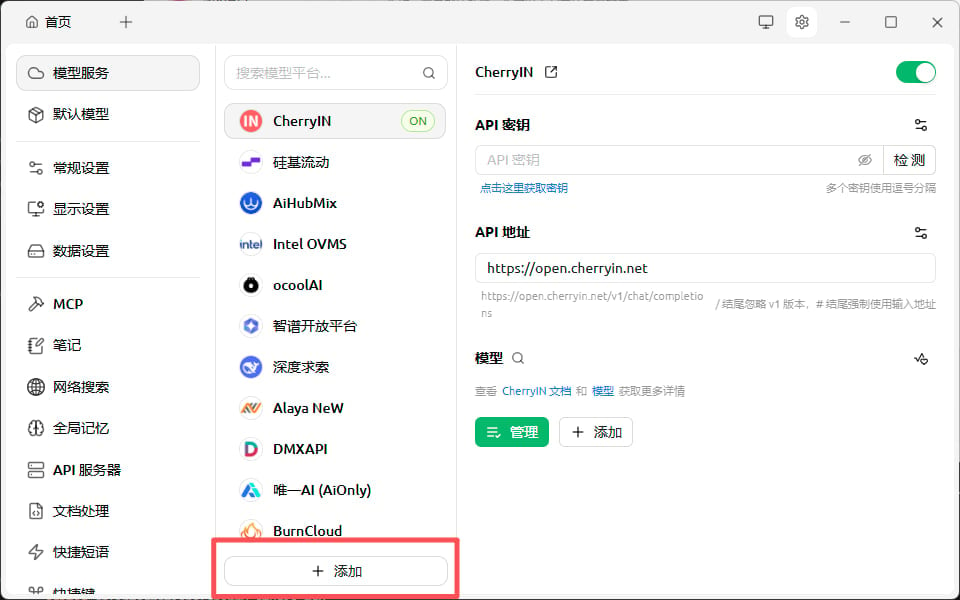
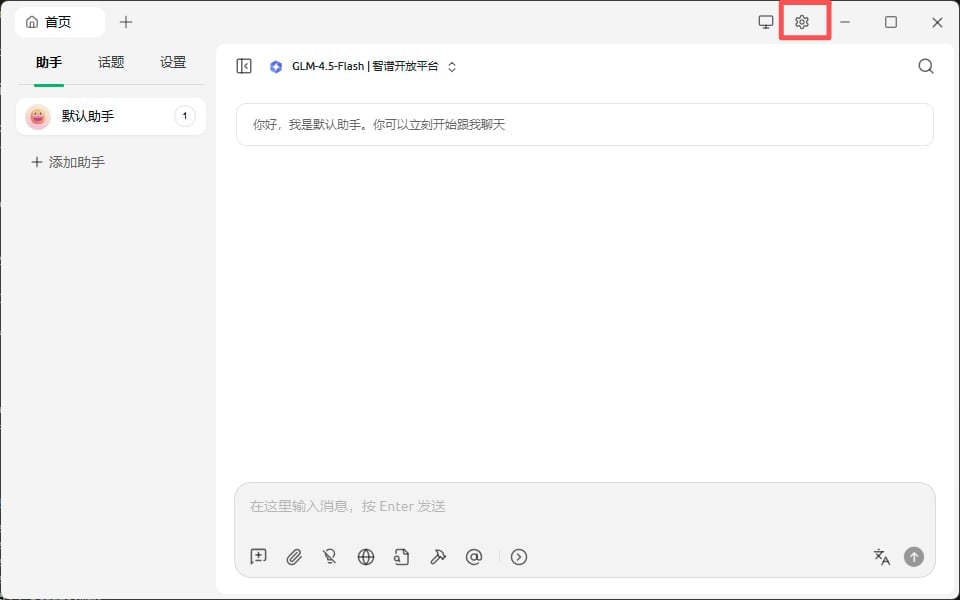
1. 打开设置，进入模型服务配置。
2. 新增一个自定义 OpenAI 兼容服务，名称填写 APIAny.AI。
3. 填写 API Key 和 API URL。
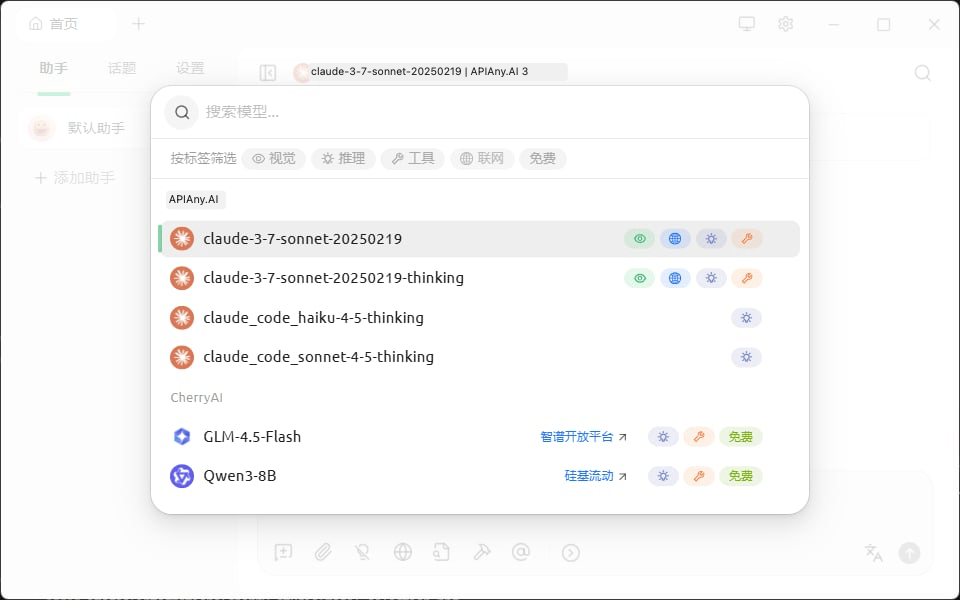
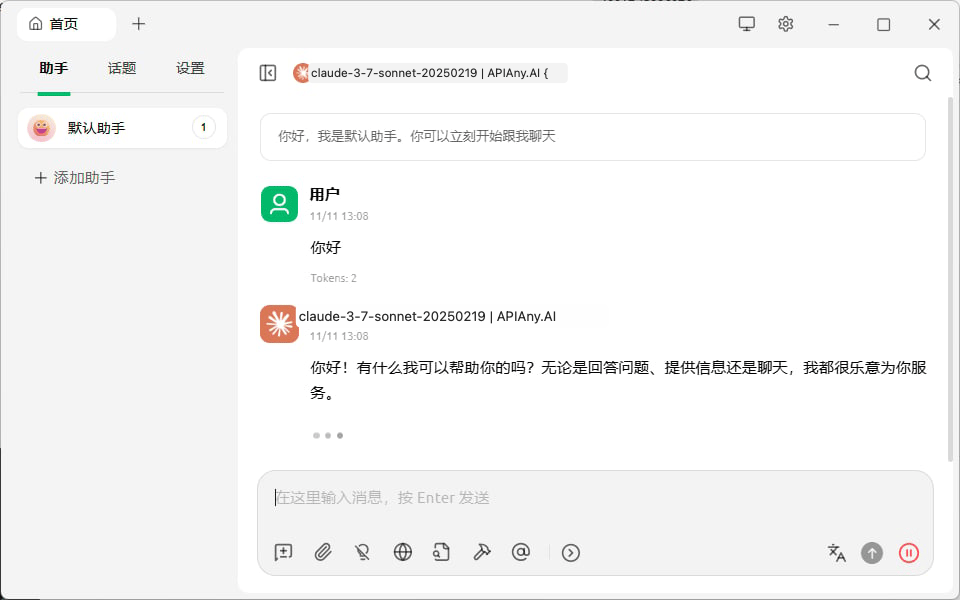
4. 在新对话中选择刚添加的模型并测试。

## 推荐模型

| 模型 ID               | 适用场景                        |
| ------------------- | --------------------------- |
| `gpt-5.5`           | 适合复杂推理、编码和生产级工作流，优先推荐。      |
| `gpt-5.4`           | 适合高级对话、Agent 和通用生产任务。       |
| `gpt-5.4-mini`      | 速度、质量和成本均衡，适合日常高频使用。        |
| `gpt-4o-mini`       | 适合简单对话、翻译和轻量任务，速度快、成本低。     |
| `claude-sonnet-4-6` | 适合 Claude 兼容配置的长文本、写作和编码任务。 |
| `gemini-3.5-flash`  | 适合 Gemini 兼容配置的快速多模态任务。     |

## 操作截图

以下截图展示 Cherry Studio 中的关键配置入口和保存后的使用界面。截图中的 API 地址和名称均已按 APIAny.AI 调整。

### 步骤 1
<img src="https://mintcdn.com/lingquai/Twqr-r52XykGBMod/images/integrations/cherry-studio/main-interface.png?fit=max&auto=format&n=Twqr-r52XykGBMod&q=85&s=67fc9b0749227bd88f176bcf4f7734e9" alt="Cherry Studio 配置截图 1" width="960" height="600" data-path="images/integrations/cherry-studio/main-interface.png" />

### 步骤 2

<img src="https://mintcdn.com/lingquai/Twqr-r52XykGBMod/images/integrations/cherry-studio/settings-providers.png?fit=max&auto=format&n=Twqr-r52XykGBMod&q=85&s=96d8191b72f82e5bd4362205bdb1e298" alt="Cherry Studio 配置截图 2" width="960" height="600" data-path="images/integrations/cherry-studio/settings-providers.png" />

### 步骤 3

<img src="https://mintcdn.com/lingquai/Twqr-r52XykGBMod/images/integrations/cherry-studio/add-provider-config.png?fit=max&auto=format&n=Twqr-r52XykGBMod&q=85&s=d205232f3bd17716af678b5880569994" alt="Cherry Studio 配置截图 3" width="960" height="600" data-path="images/integrations/cherry-studio/add-provider-config.png" />

### 步骤 4

<img src="https://mintcdn.com/lingquai/Twqr-r52XykGBMod/images/integrations/cherry-studio/settings.png?fit=max&auto=format&n=Twqr-r52XykGBMod&q=85&s=c91a9424ce4f5d0e10764fcf2e2e0aff" alt="Cherry Studio 配置截图 4" width="960" height="600" data-path="images/integrations/cherry-studio/settings.png" />

### 步骤 5

<img src="https://mintcdn.com/lingquai/Twqr-r52XykGBMod/images/integrations/cherry-studio/provider-list.png?fit=max&auto=format&n=Twqr-r52XykGBMod&q=85&s=36026e665e448becb9117124d973f838" alt="Cherry Studio 配置截图 5" width="960" height="600" data-path="images/integrations/cherry-studio/provider-list.png" />

### 步骤 6

<img src="https://mintcdn.com/lingquai/Twqr-r52XykGBMod/images/integrations/cherry-studio/model-selection.png?fit=max&auto=format&n=Twqr-r52XykGBMod&q=85&s=e717b730b4e8fed06b7d33266439d693" alt="Cherry Studio 配置截图 6" width="960" height="600" data-path="images/integrations/cherry-studio/model-selection.png" />

### 步骤 7

<img src="https://mintcdn.com/lingquai/Twqr-r52XykGBMod/images/integrations/cherry-studio/new-chat.png?fit=max&auto=format&n=Twqr-r52XykGBMod&q=85&s=bcaa8827174079d9092e5aed84a7098f" alt="Cherry Studio 配置截图 7" width="960" height="600" data-path="images/integrations/cherry-studio/new-chat.png" />

### 步骤 8

<img src="https://mintcdn.com/lingquai/Twqr-r52XykGBMod/images/integrations/cherry-studio/chat-interface.png?fit=max&auto=format&n=Twqr-r52XykGBMod&q=85&s=dfdedb355d3011e4382d9f340b18138d" alt="Cherry Studio 配置截图 8" width="960" height="600" data-path="images/integrations/cherry-studio/chat-interface.png" />

## 常见问题

### 返回 401 或认证失败

确认 API Key 已完整复制，前后没有多余空格，并且已经在 APIAny.AI 控制台中启用。

### 模型无法选择或调用失败

手动输入模型 ID，并确认该模型在 [模型目录](/zh/models/chat-models) 中可用。不同工具可能不会自动拉取模型列表。

### Base URL 应该怎么填

OpenAI 兼容配置通常使用 `https://apiany.ai/v1`；Claude 兼容配置通常使用 `https://apiany.ai`；需要完整接口地址的工具使用 `https://apiany.ai/v1/chat/completions`。